This notebook is going to teach you to use the basic data science stack for Python: Jupyter, Numpy, matplotlib, and sklearn.
Ctrl + Enter to execute the code and display output(if any).Run these cells to get started
In [ ]:


a = 5
In [ ]:


print(a * 2)
Ctrl + S to save changes (or use the button that looks like a floppy disk)Now the most important feature of jupyter notebooks for this course:
Tab to see automatic suggestions, use arrow keys + enter to pick one.Shift + Tab, you'll get a help window. Shift + (Tab , Tab) (press Tab twice) will expand it.
In [ ]:


# run this first
import math
In [ ]:


# place your cursor at the end of the unfinished line below to find a function
# that computes arctangent from two parameters (should have 2 in it's name)
# once you chose it, press shift + tab + tab(again) to see the docs

math.a  # <---
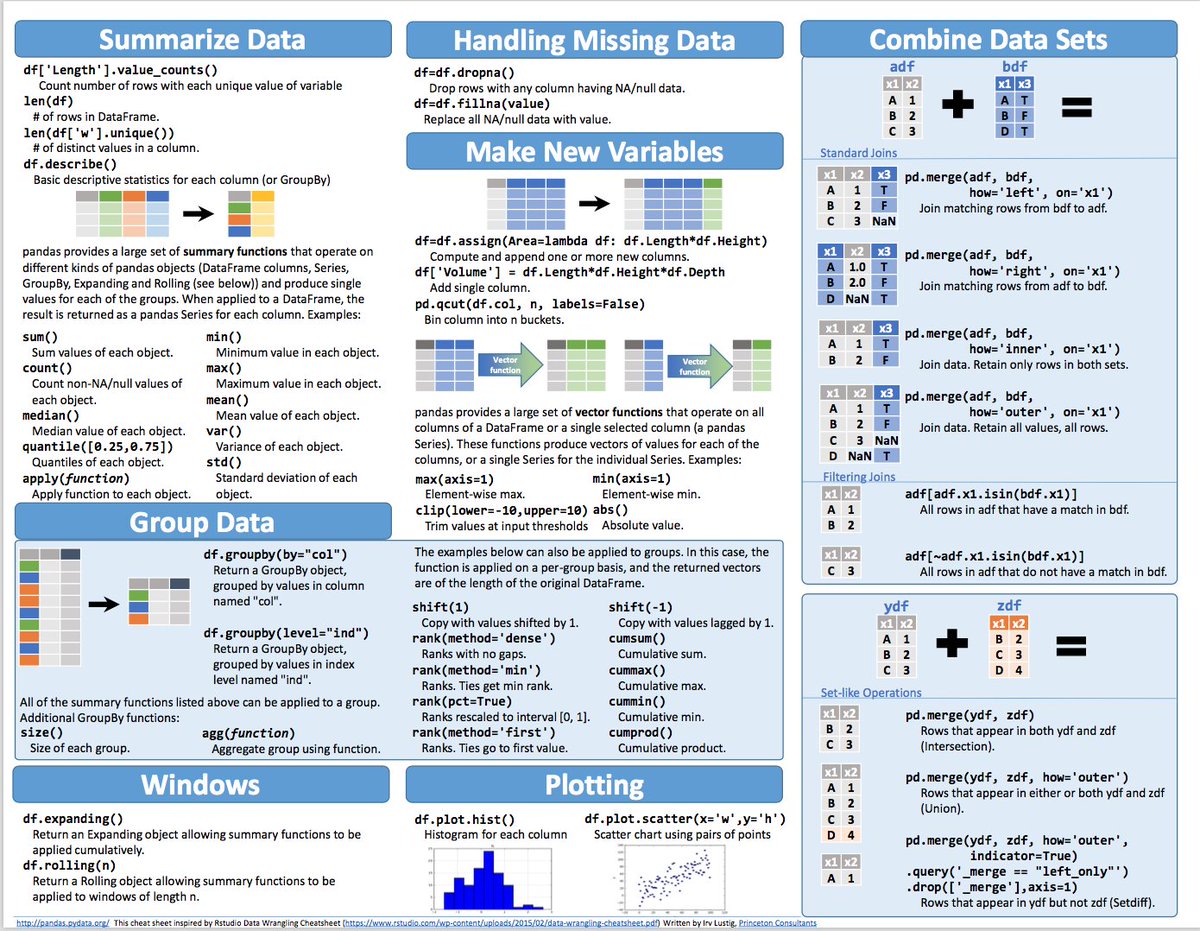
Pandas is a library that helps you load the data, prepare it and perform some lightweight analysis. The god object here is the pandas.DataFrame - a 2D table with batteries included.
In the cells below we use it to read the data on the infamous titanic shipwreck.
please keep running all the code cells as you read
In [ ]:


# If you are running in Google Colab, this cell will download the dataset from our repository.
# Otherwise, this cell will do nothing.

import sys
if 'google.colab' in sys.modules:
    !wget -q https://raw.githubusercontent.com/yandexdataschool/Practical_RL/spring20/week01_intro/primer_python_for_ml/train.csv
In [ ]:


import pandas as pd
# this yields a pandas.DataFrame
data = pd.read_csv("train.csv", index_col='PassengerId')
In [ ]:


# Selecting rows
head = data[:10]

head  # if you leave an expression at the end of a cell, jupyter will "display" it automatically
Out[ ]:
Here's some of the columns
In [ ]:


# table dimensions
print("len(data) =", len(data))
print("data.shape =", data.shape)
In [ ]:


# select a single row by PassengerId (using .loc)
print(data.loc[4])
In [ ]:


# select a single row by index (using .iloc)
print(data.iloc[3])
In [ ]:


# select a single column.
ages = data["Age"]
print(ages[:10])  # alternatively: data.Age
In [ ]:


# select several columns and rows at once
# alternatively: data[["Fare","Pclass"]].loc[5:10]
data.loc[5:10, ("Fare", "Pclass")]
Out[ ]:
In [ ]:


# Select passengers number 13 and 666 (with these PassengerId values). Did they survive?

<YOUR CODE>
In [ ]:


# Compute the overall survival rate: what fraction of passengers survived the shipwreck?

<YOUR CODE>
Pandas also has some basic data analysis tools. For one, you can quickly display statistical aggregates for each column using .describe()
In [ ]:


data.describe()
Some columns contain NaN values - this means that there is no data there. For example, passenger #6 has unknown age. To simplify the future data analysis, we'll replace NaN values by using pandas fillna function.
Note: we do this so easily because it's a tutorial. In general, you think twice before you modify data like this.
In [ ]:


data.loc[6]
In [ ]:


data['Age'] = data['Age'].fillna(value=data['Age'].mean())
data['Fare'] = data['Fare'].fillna(value=data['Fare'].mean())
In [ ]:


data.loc[6]
More pandas:
Almost any machine learning model requires some computational heavy lifting usually involving linear algebra problems. Unfortunately, raw Python is terrible at this because each operation is interpreted at runtime.
So instead, we'll use numpy - a library that lets you run blazing fast computation with vectors, matrices and other tensors. Again, the god object here is numpy.ndarray:
In [ ]:


import numpy as np

a = np.array([1, 2, 3, 4, 5])
b = np.array([5, 4, 3, 2, 1])

print("a =", a)
print("b =", b)

# math and boolean operations can applied to each element of an array
print("a + 1 =", a + 1)
print("a * 2 =", a * 2)
print("a == 2", a == 2)
# ... or corresponding elements of two (or more) arrays
print("a + b =", a + b)
print("a * b =", a * b)
In [ ]:


# Your turn: compute half-products of a and b elements (i.e. ½ of the products of corresponding elements)
<YOUR CODE>
In [ ]:


# compute elementwise quotient between squared a and (b plus 1)
<YOUR CODE>
In [ ]:


%%time
# ^-- this "magic" measures and prints cell computation time

# Option I: pure Python
arr_1 = range(1000000)
arr_2 = range(99, 1000099)


a_sum = []
a_prod = []
sqrt_a1 = []
for i in range(len(arr_1)):
    a_sum.append(arr_1[i]+arr_2[i])
    a_prod.append(arr_1[i]*arr_2[i])
    a_sum.append(arr_1[i]**0.5)

arr_1_sum = sum(arr_1)
In [ ]:


%%time

# Option II: start from Python, convert to numpy
arr_1 = range(1000000)
arr_2 = range(99, 1000099)

arr_1, arr_2 = np.array(arr_1), np.array(arr_2)


a_sum = arr_1 + arr_2
a_prod = arr_1 * arr_2
sqrt_a1 = arr_1 ** .5
arr_1_sum = arr_1.sum()
In [ ]:


%%time

# Option III: pure numpy
arr_1 = np.arange(1000000)
arr_2 = np.arange(99, 1000099)

a_sum = arr_1 + arr_2
a_prod = arr_1 * arr_2
sqrt_a1 = arr_1 ** .5
arr_1_sum = arr_1.sum()
If you want more serious benchmarks, take a look at this.
There's also a bunch of pre-implemented operations including logarithms, trigonometry, vector/matrix products and aggregations.
In [ ]:


a = np.array([1, 2, 3, 4, 5])
b = np.array([5, 4, 3, 2, 1])
print("numpy.sum(a) =", np.sum(a))
print("numpy.mean(a) =", np.mean(a))
print("numpy.min(a) =",  np.min(a))
print("numpy.argmin(b) =", np.argmin(b))  # index of minimal element
# dot product. Also used for matrix/tensor multiplication
print("numpy.dot(a,b) =", np.dot(a, b))
print(
    "numpy.unique(['male','male','female','female','male']) =",
    np.unique(['male', 'male', 'female', 'female', 'male']))
There is a lot more stuff. Check out a Numpy cheat sheet here.
The important part: all this functionality works with dataframes:
In [ ]:


print("Max ticket price: ", np.max(data["Fare"]))
print("\nThe guy who paid the most:\n", data.iloc[np.argmax(data["Fare"])])
In [ ]:


# your code: compute mean passenger age and the oldest guy on the ship
<YOUR CODE>
In [ ]:


print("Boolean operations")

print('a =', a)
print('b =', b)
print("a > 2", a > 2)
print("numpy.logical_not(a>2) =", np.logical_not(a > 2))
print("numpy.logical_and(a>2,b>2) =", np.logical_and(a > 2, b > 2))
print("numpy.logical_or(a>4,b<3) =", np.logical_or(a > 2, b < 3))

print()

print("shortcuts")
print("~(a > 2) =", ~(a > 2))  # logical_not(a > 2)
print("(a > 2) & (b > 2) =", (a > 2) & (b > 2))  # logical_and
print("(a > 2) | (b < 3) =", (a > 2) | (b < 3))  # logical_or
The final Numpy feature we'll need is indexing: selecting elements from an array.
Aside from Python indexes and slices (e.g. a[1:4]), Numpy also allows you to select several elements at once.
In [ ]:


a = np.array([0, 1, 4, 9, 16, 25])
ix = np.array([1, 2, 5])
print("a =", a)
print("Select by element index")
print("a[[1,2,5]] =", a[ix])

print("\nSelect by boolean mask")
# select all elementts in a that are greater than 5
print("a[a > 5] =", a[a > 5])
print("(a % 2 == 0) =", a % 2 == 0)  # True for even, False for odd
print("a[a % 2 == 0] =", a[a % 2 == 0])  # select all elements in a that are even


# select male children
print("data[(data['Age'] < 18) & (data['Sex'] == 'male')] = (below)")
data[(data['Age'] < 18) & (data['Sex'] == 'male')]
Out[ ]:
In [ ]:


# who on average paid more for their ticket, men or women?

mean_fare_men = <YOUR CODE>
mean_fare_women = <YOUR CODE>

print(mean_fare_men, mean_fare_women)
In [ ]:


# who is more likely to survive: a child (<18 yo) or an adult?

child_survival_rate = <YOUR CODE>
adult_survival_rate = <YOUR CODE>

print(child_survival_rate, adult_survival_rate)
Using Python to visualize the data is covered by yet another library: matplotlib.
Just like Python itself, matplotlib has an awesome tendency of keeping simple things simple while still allowing you to write complicated stuff with convenience (e.g. super-detailed plots or custom animations).
In [ ]:


import matplotlib.pyplot as plt
%matplotlib inline
# ^-- this "magic" tells all future matplotlib plots to be drawn inside notebook and not in a separate window.

# line plot
plt.plot([0, 1, 2, 3, 4, 5], [0, 1, 4, 9, 16, 25])
Out[ ]:
In [ ]:


# scatter-plot
plt.scatter([0, 1, 2, 3, 4, 5], [0, 1, 4, 9, 16, 25])

plt.show()  # show the first plot and begin drawing next one
In [ ]:


# draw a scatter plot with custom markers and colors
plt.scatter([1, 1, 2, 3, 4, 4.5], [3, 2, 2, 5, 15, 24],
            c=["red", "blue", "orange", "green", "cyan", "gray"], marker="x")

# without .show(), several plots will be drawn on top of one another
plt.plot([0, 1, 2, 3, 4, 5], [0, 1, 4, 9, 16, 25], c="black")

# adding more sugar
plt.title("Conspiracy theory proven!!!")
plt.xlabel("Per capita alcohol consumption")
plt.ylabel("# Layers in state of the art image classifier")

# fun with correlations: http://bit.ly/1FcNnWF
Out[ ]:
In [ ]:


# histogram - showing data density
plt.hist([0, 1, 1, 1, 2, 2, 3, 3, 3, 3, 3, 4, 4, 5, 5, 5, 6, 7, 7, 8, 9, 10])
plt.show()

plt.hist([0, 1, 1, 1, 2, 2, 3, 3, 3, 3, 3, 4,
          4, 5, 5, 5, 6, 7, 7, 8, 9, 10], bins=5)
Out[ ]:
In [ ]:


# plot a histogram of age and a histogram of ticket fares on separate plots

<YOUR CODE>

# bonus: use tab shift-tab to see if there is a way to draw a 2D histogram of age vs fare.
In [ ]:


# make a scatter plot of passenger age vs ticket fare

<YOUR CODE>

# kudos if you add separate colors for men and women
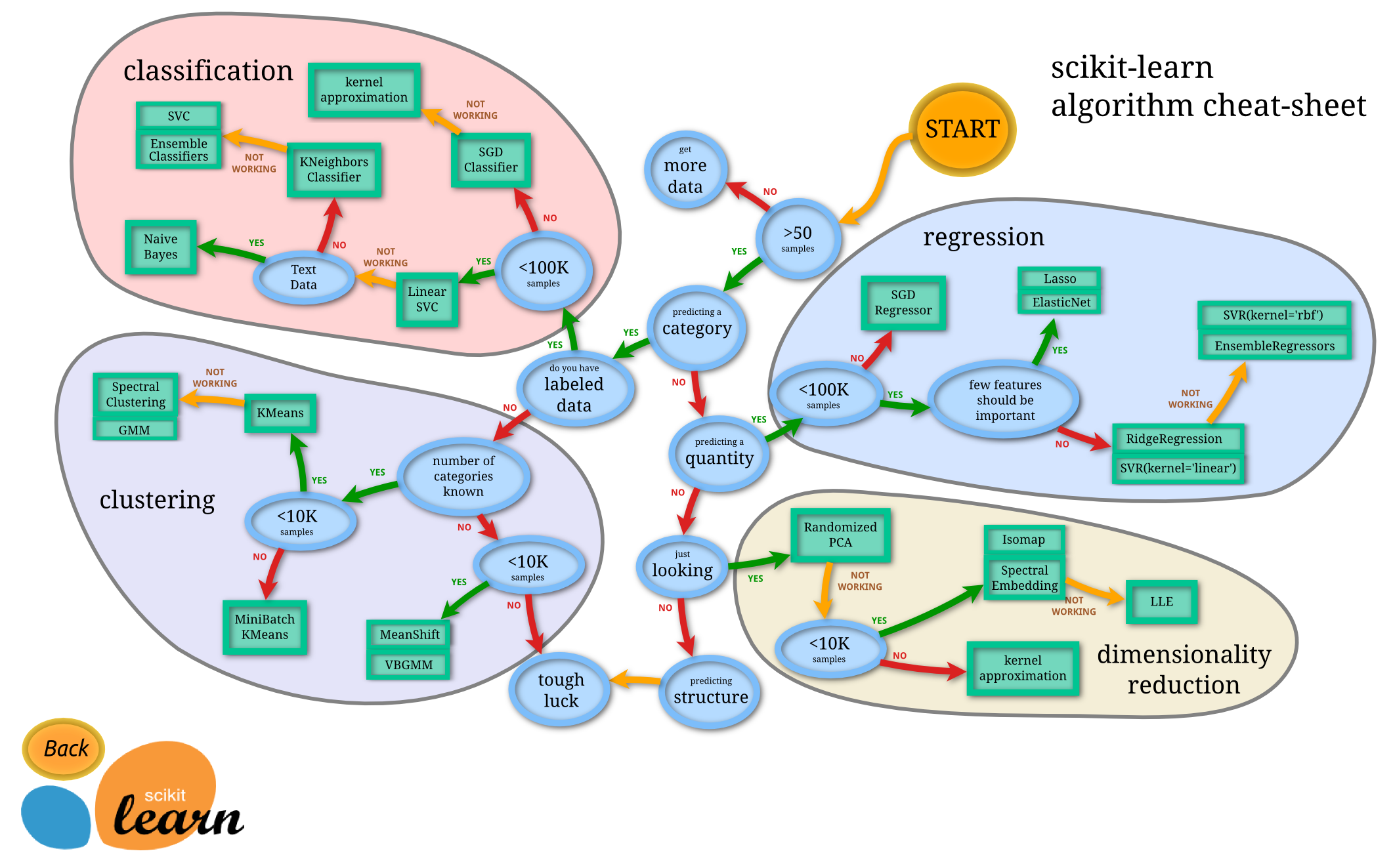
Scikit-learn is the tool for simple machine learning pipelines.
It's a single library that unites a whole bunch of models under the common interface:
model = sklearn.whatever.ModelNameHere(parameters_if_any)model.fit(X, y)model.predict(X_test)It also contains utilities for feature extraction, quality estimation or cross-validation.
In [ ]:


from sklearn.ensemble import RandomForestClassifier
from sklearn.metrics import accuracy_score

features = data[["Fare", "SibSp"]].copy()
answers = data["Survived"]

model = RandomForestClassifier(n_estimators=100)
model.fit(features[:-100], answers[:-100])

test_predictions = model.predict(features[-100:])
print("Test accuracy:", accuracy_score(answers[-100:], test_predictions))
Final quest: add more features to achieve accuracy of at least 0.80
Hint: for string features like "Sex" or "Embarked" you will have to compute some kind of numeric representation. For example, 1 if male and 0 if female or vice versa
Hint II: you can use model.feature_importances_ to get a hint on how much did it rely each of your features.
Here are more resources for sklearn:
Okay, here's what we've learned: to survive a shipwreck you need to become an underaged girl with parents on the ship. Be sure to use this helpful advice next time you find yourself in a shipwreck.