In [1]:


import pandas as pd
import numpy as np
import pylab as pl
Algorithms are implemented with the same core functions:
Scikit-Learn reply to today's @wiseio Random Forest benchmark: https://t.co/El5at9KvHS … Coming soon in the next 0.14 stable release!
— Gilles Louppe (@glouppe) July 16, 2013
In [2]:


from sklearn.datasets import load_iris

iris = load_iris()
df = pd.DataFrame(iris.data, columns=iris.feature_names)
df['species'] = iris.target
In [3]:


from sklearn.svm import SVC
from sklearn.neighbors import KNeighborsClassifier
In [6]:


svm_clf = SVC()
neighbors_clf = KNeighborsClassifier()
clfs = [
    ("svc", SVC()),
    ("KNN", KNeighborsClassifier())
    ]
for name, clf in clfs:
    clf.fit(df[iris.feature_names], df.species)
    print name, clf.predict(iris.data)
    pd.crosstab(df.species, clf.predict(df[iris.feature_names]))
    print "*"*80
from sklearn.ensemble import RandomForestClassifier) and see how it does
In [7]:


from sklearn.ensemble import RandomForestClassifier
clf = RandomForestClassifier()
clf.fit(df[iris.feature_names], df.species)
clf.predict(df[iris.feature_names])
pd.crosstab(df.species, clf.predict(df[iris.feature_names]))
Out[7]:
In [7]:


from sklearn import tree

clf = tree.DecisionTreeClassifier(max_features="auto",
                                  min_samples_leaf=10)
clf.fit(df[iris.feature_names], df.species)
Out[7]:
In [8]:


from sklearn.externals.six import StringIO
with open("iris.dot", 'w') as f:
    f = tree.export_graphviz(clf, out_file=f)
In [9]:


# you will need to install graphviz
#(http://www.graphviz.org/Download..php) and pydot (pip install pydot)
! dot -Tpng iris.dot -o iris.png
In [10]:


from IPython.core.display import Image
Image("iris.png")
Out[10]:
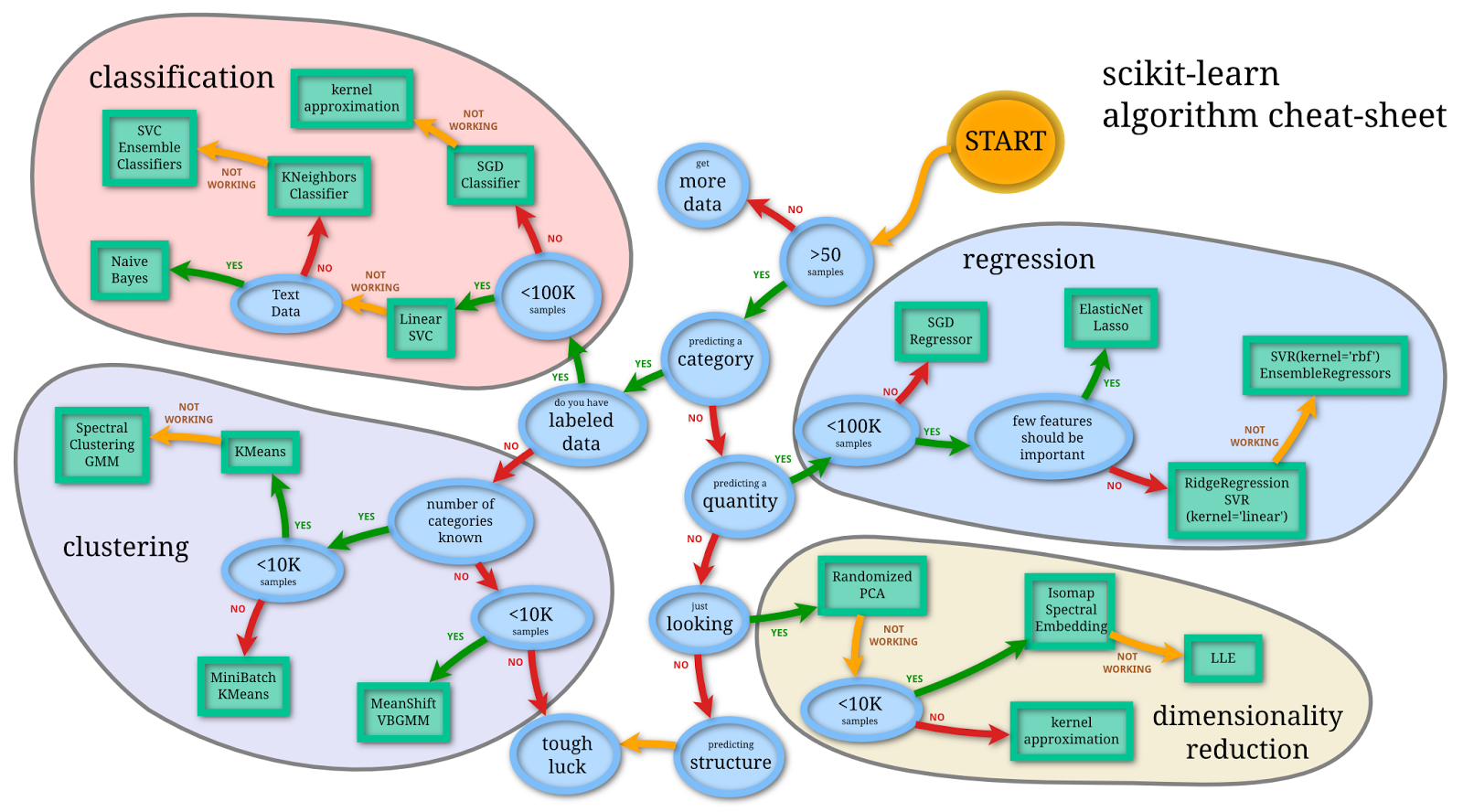
Andy Mueller (scikit-learn contributor) put together this cheat sheet a few months ago which is extremely helpful.
In [13]:


Image(url="http://1.bp.blogspot.com/-ME24ePzpzIM/UQLWTwurfXI/AAAAAAAAANw/W3EETIroA80/s1600/drop_shadows_background.png",
      width=700)
Out[13]:
In [13]:


from sklearn.datasets import load_boston
boston = load_boston()
In [34]:


import re


def camel_to_snake(column_name):
    """
    converts a string that is camelCase into snake_case
    Example:
        print camel_to_snake("javaLovesCamelCase")
        > java_loves_camel_case
    See Also:
        http://stackoverflow.com/questions/1175208/elegant-python-function-to-convert-camelcase-to-camel-case
    """
    s1 = re.sub('(.)([A-Z][a-z]+)', r'\1_\2', column_name)
    return re.sub('([a-z0-9])([A-Z])', r'\1_\2', s1).lower()

df = pd.DataFrame(boston.data)
df.columns = [camel_to_snake(col) for col in boston.feature_names[:-1]]
# add in prices
df['price'] = boston.target
print len(df)==506
df.head()
Out[34]:
In [37]:


from sklearn.linear_model import LinearRegression

features = ['age', 'lstat', 'tax']
lm = LinearRegression()
lm.fit(df[features], df.price)
Out[37]:
In [38]:


# add your actual vs. predicted points
pl.scatter(df.price, lm.predict(df[features]))
# add the line of perfect fit
straight_line = np.arange(0, 60)
pl.plot(straight_line, straight_line)
pl.title("Fitted Values")
Out[38]:
In [ ]: