NumPy

NumPy란

NumPy Array


In [1]:
import numpy as np
a = np.array([0,1,2,3])
a


Out[1]:
array([0, 1, 2, 3])

Python List vs NumPy Array

  • Python List
    • 여러가지 타입의 원소
    • 메모리 용량이 크고 속도가 느림
    • nesting 가능
    • 전체 연산 불가
  • NumPy Array
    • 동일 타입의 원소
    • 메모리 최적화, 계산 속도 향상
    • 크기(dimension)이 명확하게 정의
    • 전체 연산 가능

In [2]:
L = range(1000)
%timeit [i**2 for i in L]


10000 loops, best of 3: 138 µs per loop

In [3]:
a = np.arange(1000)
%timeit a**2


The slowest run took 19.28 times longer than the fastest. This could mean that an intermediate result is being cached.
100000 loops, best of 3: 3.29 µs per loop

In [4]:
L = range(3)
L


Out[4]:
[0, 1, 2]

In [5]:
L * 2


Out[5]:
[0, 1, 2, 0, 1, 2]

In [6]:
[i * 2 for i in L]


Out[6]:
[0, 2, 4]

In [8]:
a = np.arange(3)
a


Out[8]:
array([0, 1, 2])

In [9]:
a * 2


Out[9]:
array([0, 2, 4])

Create Array (1D)


In [10]:
a = np.array([0,1,2,3])

In [11]:
a.ndim


Out[11]:
1

In [12]:
a.shape


Out[12]:
(4L,)

In [13]:
len(a)


Out[13]:
4

Create Array (2D)


In [14]:
b = np.array([[0,1,2],[3,4,5]])    # 2 x 3 array
b


Out[14]:
array([[0, 1, 2],
       [3, 4, 5]])

In [15]:
b.ndim


Out[15]:
2

In [16]:
b.shape


Out[16]:
(2L, 3L)

In [17]:
len(b)


Out[17]:
2

In [18]:
a2 = np.array([[0,1,2,3]]).T
a2


Out[18]:
array([[0],
       [1],
       [2],
       [3]])

In [19]:
a3 = np.array([[0], [1], [2], [3]])
a3


Out[19]:
array([[0],
       [1],
       [2],
       [3]])

In [20]:
a2.shape, a3.shape


Out[20]:
((4L, 1L), (4L, 1L))

Create Array (3D)


In [22]:
c = np.array([[[1,2],[3,4]], [[5,6], [7,8]]])
c


Out[22]:
array([[[1, 2],
        [3, 4]],

       [[5, 6],
        [7, 8]]])

In [24]:
c.ndim, c.shape


Out[24]:
(3, (2L, 2L, 2L))

In [25]:
len(c)


Out[25]:
2

1 dim vs 2 dim


In [26]:
a = np.arange(4)
a


Out[26]:
array([0, 1, 2, 3])

In [27]:
a.shape


Out[27]:
(4L,)

In [31]:
b = np.array([[0,1,2,3]])
b


Out[31]:
array([[0, 1, 2, 3]])

In [32]:
b.shape


Out[32]:
(1L, 4L)

In [33]:
c = np.array([[0], [1], [2], [3]])
c


Out[33]:
array([[0],
       [1],
       [2],
       [3]])

In [34]:
c.shape


Out[34]:
(4L, 1L)

Transpose


In [35]:
a = np.array([[0,1,2,3]])
a


Out[35]:
array([[0, 1, 2, 3]])

In [36]:
a.shape


Out[36]:
(1L, 4L)

In [39]:
b = a.T
b


Out[39]:
array([[0],
       [1],
       [2],
       [3]])

In [38]:
b.shape


Out[38]:
(4L, 1L)

Array Creation Functions

  • arange
  • linspace, logspace
  • zeros, ones
  • rand, randn
  • tile

In [40]:
a = np.arange(10)   # 0 .. n-1  (!)
a


Out[40]:
array([0, 1, 2, 3, 4, 5, 6, 7, 8, 9])

In [41]:
b = np.arange(1, 9, 2)   # start, end (exclusive), step
b


Out[41]:
array([1, 3, 5, 7])

In [42]:
c = np.linspace(0, 1, 6) # start, end, num-points
c


Out[42]:
array([ 0. ,  0.2,  0.4,  0.6,  0.8,  1. ])

In [45]:
d = np.linspace(0, 1, 5, endpoint=False)
d


Out[45]:
array([ 0. ,  0.2,  0.4,  0.6,  0.8])

In [46]:
a = np.ones((3, 3))   # reminder: (3, 3) is a tuple
a


Out[46]:
array([[ 1.,  1.,  1.],
       [ 1.,  1.,  1.],
       [ 1.,  1.,  1.]])

In [48]:
b = np.zeros((2,2))
b


Out[48]:
array([[ 0.,  0.],
       [ 0.,  0.]])

In [49]:
c = np.diag([1,2,3])
c


Out[49]:
array([[1, 0, 0],
       [0, 2, 0],
       [0, 0, 3]])

In [50]:
d = np.eye(4)
d


Out[50]:
array([[ 1.,  0.,  0.,  0.],
       [ 0.,  1.,  0.,  0.],
       [ 0.,  0.,  1.,  0.],
       [ 0.,  0.,  0.,  1.]])

In [51]:
a = np.array([0,1,2])
a


Out[51]:
array([0, 1, 2])

In [52]:
np.tile(a, 2)


Out[52]:
array([0, 1, 2, 0, 1, 2])

In [61]:
np.tile(a, (3,2)), (np.tile(a, (3,2))).ndim, (np.tile(a, (3,2))).shape


Out[61]:
(array([[0, 1, 2, 0, 1, 2],
        [0, 1, 2, 0, 1, 2],
        [0, 1, 2, 0, 1, 2]]), 2, (3L, 6L))

In [60]:
np.tile(a, (2,1,2)), np.tile(a, (2,1,2)).ndim, np.tile(a, (2,1,2)).shape


Out[60]:
(array([[[0, 1, 2, 0, 1, 2]],
 
        [[0, 1, 2, 0, 1, 2]]]), 3, (2L, 1L, 6L))

In [62]:
b = np.array([[1,2], [3,4]])
b


Out[62]:
array([[1, 2],
       [3, 4]])

In [63]:
b.shape


Out[63]:
(2L, 2L)

In [64]:
np.tile(b, 2)


Out[64]:
array([[1, 2, 1, 2],
       [3, 4, 3, 4]])

In [65]:
np.tile(b, (2, 1))


Out[65]:
array([[1, 2],
       [3, 4],
       [1, 2],
       [3, 4]])

Shape Change

  • reshape
  • flatten, ravel

In [66]:
a = np.arange(20)
a


Out[66]:
array([ 0,  1,  2,  3,  4,  5,  6,  7,  8,  9, 10, 11, 12, 13, 14, 15, 16,
       17, 18, 19])

In [67]:
b = np.reshape(a, (4,5))
b


Out[67]:
array([[ 0,  1,  2,  3,  4],
       [ 5,  6,  7,  8,  9],
       [10, 11, 12, 13, 14],
       [15, 16, 17, 18, 19]])

In [69]:
c = np.reshape(b, (5,4))
c


Out[69]:
array([[ 0,  1,  2,  3],
       [ 4,  5,  6,  7],
       [ 8,  9, 10, 11],
       [12, 13, 14, 15],
       [16, 17, 18, 19]])

In [70]:
d = a.reshape(4,5)
d


Out[70]:
array([[ 0,  1,  2,  3,  4],
       [ 5,  6,  7,  8,  9],
       [10, 11, 12, 13, 14],
       [15, 16, 17, 18, 19]])
  • 인수가 -1
    • numpy가 나머지 인수들을 이용하여 사이즈를 맞춘다.

In [71]:
a = np.arange(24)
a.reshape(2, 12)


Out[71]:
array([[ 0,  1,  2,  3,  4,  5,  6,  7,  8,  9, 10, 11],
       [12, 13, 14, 15, 16, 17, 18, 19, 20, 21, 22, 23]])

In [72]:
a.reshape(2, -1)


Out[72]:
array([[ 0,  1,  2,  3,  4,  5,  6,  7,  8,  9, 10, 11],
       [12, 13, 14, 15, 16, 17, 18, 19, 20, 21, 22, 23]])

In [73]:
a.reshape(-1, 12)


Out[73]:
array([[ 0,  1,  2,  3,  4,  5,  6,  7,  8,  9, 10, 11],
       [12, 13, 14, 15, 16, 17, 18, 19, 20, 21, 22, 23]])

In [74]:
c


Out[74]:
array([[ 0,  1,  2,  3],
       [ 4,  5,  6,  7],
       [ 8,  9, 10, 11],
       [12, 13, 14, 15],
       [16, 17, 18, 19]])

In [79]:
d = c.flatten() # return a copy
d


Out[79]:
array([ 0,  1,  2,  3,  4,  5,  6,  7,  8,  9, 10, 11, 12, 13, 14, 15, 16,
       17, 18, 19])

In [77]:
d.base is None


Out[77]:
True

In [81]:
e = c.ravel()
e


Out[81]:
array([ 0,  1,  2,  3,  4,  5,  6,  7,  8,  9, 10, 11, 12, 13, 14, 15, 16,
       17, 18, 19])

In [82]:
e.base


Out[82]:
array([ 0,  1,  2,  3,  4,  5,  6,  7,  8,  9, 10, 11, 12, 13, 14, 15, 16,
       17, 18, 19])

Stack

  • hstack
  • vstack
  • dstack

In [83]:
a = np.arange(5)
a


Out[83]:
array([0, 1, 2, 3, 4])

In [84]:
np.vstack([a * 10, a * 20])


Out[84]:
array([[ 0, 10, 20, 30, 40],
       [ 0, 20, 40, 60, 80]])

In [85]:
b = np.arange(5)[:, np.newaxis]
b


Out[85]:
array([[0],
       [1],
       [2],
       [3],
       [4]])

In [86]:
np.hstack([b * 10, b * 20])


Out[86]:
array([[ 0,  0],
       [10, 20],
       [20, 40],
       [30, 60],
       [40, 80]])

In [87]:
a = np.array((1,2,3))
b = np.array((2,3,4))

In [88]:
a, a.shape


Out[88]:
(array([1, 2, 3]), (3L,))

In [89]:
np.dstack((a,b))


Out[89]:
array([[[1, 2],
        [2, 3],
        [3, 4]]])

In [91]:
a = np.array([[1], [2], [3]])
b = np.array([[2], [3], [4]])
np.dstack((a,b))


Out[91]:
array([[[1, 2]],

       [[2, 3]],

       [[3, 4]]])

dtype

  • bool Boolean (True or False) stored as a byte
  • int8 Byte (-128 to 127)
  • int16 Integer (-32768 to 32767)
  • int32 Integer (-2147483648 to 2147483647)
  • int64 Integer (-9223372036854775808 to 9223372036854775807)
  • uint8 Unsigned integer (0 to 255)
  • uint16 Unsigned integer (0 to 65535)
  • uint32 Unsigned integer (0 to 4294967295)
  • uint64 Unsigned integer (0 to 18446744073709551615)
  • float16 Half precision float: sign bit, 5 bits exponent, 10 bits mantissa
  • float32 Single precision float: sign bit, 8 bits exponent, 23 bits mantissa
  • float64 Double precision float: sign bit, 11 bits exponent, 52 bits mantissa
  • S String

In [92]:
a = np.array([1,2,3])
a.dtype


Out[92]:
dtype('int32')

In [93]:
b = np.array([1., 2., 3.])
b.dtype


Out[93]:
dtype('float64')

In [94]:
c = np.array([1,2,3], dtype=np.float64)
c.dtype


Out[94]:
dtype('float64')

In [95]:
d = np.array([1+2j, 3+4j, 5+6*1j])
d.dtype


Out[95]:
dtype('complex128')

In [96]:
e = np.array([True, False, False, True])
e.dtype


Out[96]:
dtype('bool')

In [97]:
f = np.array(['Bonjour', 'Hello', 'Hallo',])
f.dtype


Out[97]:
dtype('S7')
  • NaN Not a Number
  • Inf Infinity

In [100]:
x = np.array([-1, 1, 0]) / np.array([0, 0, 0])   #Python 2.7 version
x


Out[100]:
array([0, 0, 0])

In [75]:
x = np.array([1, -1, 0]) / np.array([0, 0, 0])   #3. version
x


Out[75]:
array([ inf, -inf,  nan])

In [76]:
x[0]


Out[76]:
inf

In [101]:
np.inf, np.nan


Out[101]:
(inf, nan)

Indexing


In [102]:
a = np.arange(10)
a


Out[102]:
array([0, 1, 2, 3, 4, 5, 6, 7, 8, 9])

In [103]:
a[0], a[2], a[-1]


Out[103]:
(0, 2, 9)

In [104]:
a[::-1]


Out[104]:
array([9, 8, 7, 6, 5, 4, 3, 2, 1, 0])

Multi-dimensional Indexing


In [105]:
l = [[0,0,0], [0,1,0], [0,0,2]]
l[1]


Out[105]:
[0, 1, 0]

In [106]:
l[1][1]


Out[106]:
1

In [107]:
a = np.diag(np.arange(3))
a


Out[107]:
array([[0, 0, 0],
       [0, 1, 0],
       [0, 0, 2]])

In [108]:
a[1, 1]


Out[108]:
1

In [109]:
a[2, 1] = 10 # third line, second column
a


Out[109]:
array([[ 0,  0,  0],
       [ 0,  1,  0],
       [ 0, 10,  2]])

In [110]:
a[2] = [10, 20, 30]
a


Out[110]:
array([[ 0,  0,  0],
       [ 0,  1,  0],
       [10, 20, 30]])

Slicing


In [111]:
a = np.arange(10)
a


Out[111]:
array([0, 1, 2, 3, 4, 5, 6, 7, 8, 9])

In [112]:
a[2:9:3]


Out[112]:
array([2, 5, 8])

In [113]:
a[:4]


Out[113]:
array([0, 1, 2, 3])

In [114]:
a[1:3]


Out[114]:
array([1, 2])

In [115]:
a[::2]


Out[115]:
array([0, 2, 4, 6, 8])

In [116]:
a[3:]


Out[116]:
array([3, 4, 5, 6, 7, 8, 9])

Multi-dimensional Slicing


In [117]:
a = np.arange(6) + (np.arange(6) * 10)[:, np.newaxis]
a


Out[117]:
array([[ 0,  1,  2,  3,  4,  5],
       [10, 11, 12, 13, 14, 15],
       [20, 21, 22, 23, 24, 25],
       [30, 31, 32, 33, 34, 35],
       [40, 41, 42, 43, 44, 45],
       [50, 51, 52, 53, 54, 55]])

In [118]:
a[0, :]


Out[118]:
array([0, 1, 2, 3, 4, 5])

In [119]:
a[:, 0]


Out[119]:
array([ 0, 10, 20, 30, 40, 50])

newaxis

  • 차원 확장

In [120]:
a = np.arange(4)
a, a.shape


Out[120]:
(array([0, 1, 2, 3]), (4L,))

In [123]:
b = np.arange(4).reshape(4,1)
b, b.shape


Out[123]:
(array([[0],
        [1],
        [2],
        [3]]), (4L, 1L))

In [124]:
c = np.arange(4)[:, np.newaxis]
c


Out[124]:
array([[0],
       [1],
       [2],
       [3]])

In [125]:
c.shape


Out[125]:
(4L, 1L)

View

  • A slicing operation creates a view on the original array, which is just a way of accessing array data.
  • Thus the original array is not copied in memory.

In [126]:
a = np.arange(10)
a


Out[126]:
array([0, 1, 2, 3, 4, 5, 6, 7, 8, 9])

In [127]:
b = a[::2]
b


Out[127]:
array([0, 2, 4, 6, 8])

In [128]:
a[0] = 99
a


Out[128]:
array([99,  1,  2,  3,  4,  5,  6,  7,  8,  9])

In [129]:
b


Out[129]:
array([99,  2,  4,  6,  8])

Copy


In [130]:
a = np.arange(5)
a


Out[130]:
array([0, 1, 2, 3, 4])

In [131]:
b = a.copy()
b


Out[131]:
array([0, 1, 2, 3, 4])

In [132]:
a[0] = 99
a


Out[132]:
array([99,  1,  2,  3,  4])

In [133]:
b


Out[133]:
array([0, 1, 2, 3, 4])

Fancy indexing 팬시 인덱싱

  • Boolean Fancy Indexing
    • True인 원소만 선택
    • 크기가 같아야 한다.
  • list
    • 또는 tuple, or array
    • 지정된 인덱스만 선택
    • 크기가 달라도 된다.
  • multi dimension에도 사용 가능
  • create copy, not view

In [134]:
a = np.arange(20)
a


Out[134]:
array([ 0,  1,  2,  3,  4,  5,  6,  7,  8,  9, 10, 11, 12, 13, 14, 15, 16,
       17, 18, 19])

In [135]:
a % 2


Out[135]:
array([0, 1, 0, 1, 0, 1, 0, 1, 0, 1, 0, 1, 0, 1, 0, 1, 0, 1, 0, 1])

In [136]:
idx = (a % 2) == 0
idx


Out[136]:
array([ True, False,  True, False,  True, False,  True, False,  True,
       False,  True, False,  True, False,  True, False,  True, False,
        True, False], dtype=bool)

In [137]:
a[idx]


Out[137]:
array([ 0,  2,  4,  6,  8, 10, 12, 14, 16, 18])

In [138]:
a[(a % 2) == 0]


Out[138]:
array([ 0,  2,  4,  6,  8, 10, 12, 14, 16, 18])

In [139]:
a = np.arange(50) * 10
a


Out[139]:
array([  0,  10,  20,  30,  40,  50,  60,  70,  80,  90, 100, 110, 120,
       130, 140, 150, 160, 170, 180, 190, 200, 210, 220, 230, 240, 250,
       260, 270, 280, 290, 300, 310, 320, 330, 340, 350, 360, 370, 380,
       390, 400, 410, 420, 430, 440, 450, 460, 470, 480, 490])

In [140]:
idx = [1, 3, 4, -1, 30]
a[idx]


Out[140]:
array([ 10,  30,  40, 490, 300])

In [141]:
a[[1,3,4,-1,30]]


Out[141]:
array([ 10,  30,  40, 490, 300])

In [143]:
a = np.arange(6) + (np.arange(6) * 10)[:, np.newaxis]
a


Out[143]:
array([[ 0,  1,  2,  3,  4,  5],
       [10, 11, 12, 13, 14, 15],
       [20, 21, 22, 23, 24, 25],
       [30, 31, 32, 33, 34, 35],
       [40, 41, 42, 43, 44, 45],
       [50, 51, 52, 53, 54, 55]])

In [144]:
a[[0,1,2,3,4],(1,2,3,4,5)]


Out[144]:
array([ 1, 12, 23, 34, 45])

In [145]:
a[3:, [0,2,5]]


Out[145]:
array([[30, 32, 35],
       [40, 42, 45],
       [50, 52, 55]])

Array Operation

Elementwise operations


In [146]:
a = np.array([1,2,4,5])
a


Out[146]:
array([1, 2, 4, 5])

In [147]:
a + 1


Out[147]:
array([2, 3, 5, 6])

In [148]:
2**a


Out[148]:
array([ 2,  4, 16, 32])

In [149]:
b = np.ones(4) + 1
b


Out[149]:
array([ 2.,  2.,  2.,  2.])

In [150]:
a - b


Out[150]:
array([-1.,  0.,  2.,  3.])

In [151]:
a + b


Out[151]:
array([ 3.,  4.,  6.,  7.])

In [152]:
c = np.ones((3,3))
c


Out[152]:
array([[ 1.,  1.,  1.],
       [ 1.,  1.,  1.],
       [ 1.,  1.,  1.]])

In [153]:
c * c # element-wise, NOT Matrix product


Out[153]:
array([[ 1.,  1.,  1.],
       [ 1.,  1.,  1.],
       [ 1.,  1.,  1.]])

In [154]:
c.dot(c)   # matrix product


Out[154]:
array([[ 3.,  3.,  3.],
       [ 3.,  3.,  3.],
       [ 3.,  3.,  3.]])

In [155]:
a = np.array([1,2,3,4])
b = np.array([4,2,2,4])

In [156]:
a == b


Out[156]:
array([False,  True, False,  True], dtype=bool)

In [157]:
a > b


Out[157]:
array([False, False,  True, False], dtype=bool)

In [158]:
a = np.array([1, 2, 3, 4])
b = np.array([4, 2, 2, 4])
c = np.array([1, 2, 3, 4])

In [159]:
np.array_equal(a,b)


Out[159]:
False

In [160]:
np.array_equal(a,c)


Out[160]:
True

In [161]:
a = np.arange(5)

In [162]:
np.sin(a)


Out[162]:
array([ 0.        ,  0.84147098,  0.90929743,  0.14112001, -0.7568025 ])

In [163]:
np.log(a)


Out[163]:
array([       -inf,  0.        ,  0.69314718,  1.09861229,  1.38629436])

In [164]:
np.exp(a)


Out[164]:
array([  1.        ,   2.71828183,   7.3890561 ,  20.08553692,  54.59815003])

In [165]:
np.log10(a)


Out[165]:
array([       -inf,  0.        ,  0.30103   ,  0.47712125,  0.60205999])

In [166]:
a = np.arange(4)
b = np.array([1,2])
a, b


Out[166]:
(array([0, 1, 2, 3]), array([1, 2]))

In [167]:
a + b


---------------------------------------------------------------------------
ValueError                                Traceback (most recent call last)
<ipython-input-167-f96fb8f649b6> in <module>()
----> 1 a + b

ValueError: operands could not be broadcast together with shapes (4,) (2,) 

Dimension Reduction Operation

  • sum
  • min, max, argmin, argmax
  • mean, median, std, var
  • all, any

In [168]:
x = np.array([1,2,3,4])
x


Out[168]:
array([1, 2, 3, 4])

In [169]:
np.sum(x)


Out[169]:
10

In [170]:
x.sum()


Out[170]:
10

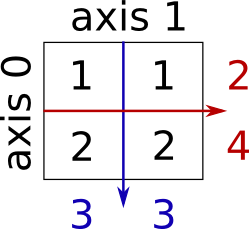
In [172]:
x = np.array([[1,1], [2,2]])
x


Out[172]:
array([[1, 1],
       [2, 2]])

<img src="http://www.scipy-lectures.org/_images/reductions.png", style="width: 20%; margin: 0 auto 0 auto;">


In [173]:
x.sum()


Out[173]:
6

In [175]:
x.sum(axis=0)   # columns (first dimension)


Out[175]:
array([3, 3])

In [176]:
x.sum(axis=1)   # rows (second dimension)


Out[176]:
array([2, 4])

In [177]:
x = np.array([1, 3, 2])

In [178]:
x.min()


Out[178]:
1

In [179]:
x.max()


Out[179]:
3

In [180]:
x.argmin()  # index of minimum


Out[180]:
0

In [181]:
x.argmax()  # index of maximum


Out[181]:
1

In [182]:
np.all([True, True, False])


Out[182]:
False

In [183]:
np.any([True, True, False])


Out[183]:
True

In [184]:
a = np.zeros((100, 100), dtype=np.int)
a


Out[184]:
array([[0, 0, 0, ..., 0, 0, 0],
       [0, 0, 0, ..., 0, 0, 0],
       [0, 0, 0, ..., 0, 0, 0],
       ..., 
       [0, 0, 0, ..., 0, 0, 0],
       [0, 0, 0, ..., 0, 0, 0],
       [0, 0, 0, ..., 0, 0, 0]])

In [185]:
np.any(a != 0)


Out[185]:
False

In [186]:
np.all(a == a)


Out[186]:
True

In [187]:
a = np.array([1, 2, 3, 2])
b = np.array([2, 2, 3, 2])
c = np.array([6, 4, 4, 5])

In [188]:
((a <= b) & (b <= c)).all()


Out[188]:
True

In [189]:
x = np.array([1, 2, 3, 1])
y = np.array([[1, 2, 3], [5, 6, 1]])

In [190]:
x.mean()


Out[190]:
1.75

In [191]:
np.median(x)


Out[191]:
1.5

In [197]:
np.median(y, axis=-1) # last axis


Out[197]:
array([ 2.,  5.])

In [193]:
x.std()          # full population standard dev.


Out[193]:
0.82915619758884995

Broadcasting


In [198]:
a = np.tile(np.arange(0, 40, 10), (3, 1)).T
a


Out[198]:
array([[ 0,  0,  0],
       [10, 10, 10],
       [20, 20, 20],
       [30, 30, 30]])

In [199]:
np.tile(np.arange(0, 40, 10), (3, 1))


Out[199]:
array([[ 0, 10, 20, 30],
       [ 0, 10, 20, 30],
       [ 0, 10, 20, 30]])

In [200]:
b = np.array([0, 1, 2])
b


Out[200]:
array([0, 1, 2])

In [201]:
a + b


Out[201]:
array([[ 0,  1,  2],
       [10, 11, 12],
       [20, 21, 22],
       [30, 31, 32]])

In [202]:
a[:, 0][:, np.newaxis]


Out[202]:
array([[ 0],
       [10],
       [20],
       [30]])

In [203]:
a[:, 0][:, np.newaxis] + b


Out[203]:
array([[ 0,  1,  2],
       [10, 11, 12],
       [20, 21, 22],
       [30, 31, 32]])

In [204]:
a = np.ones((4, 5))
a


Out[204]:
array([[ 1.,  1.,  1.,  1.,  1.],
       [ 1.,  1.,  1.,  1.,  1.],
       [ 1.,  1.,  1.,  1.,  1.],
       [ 1.,  1.,  1.,  1.,  1.]])

In [205]:
a[0]


Out[205]:
array([ 1.,  1.,  1.,  1.,  1.])

In [206]:
a[0] = 2
a


Out[206]:
array([[ 2.,  2.,  2.,  2.,  2.],
       [ 1.,  1.,  1.,  1.,  1.],
       [ 1.,  1.,  1.,  1.,  1.],
       [ 1.,  1.,  1.,  1.,  1.]])

In [207]:
x, y = np.arange(5), np.arange(5)[:, np.newaxis]

In [209]:
x


Out[209]:
array([0, 1, 2, 3, 4])

In [210]:
y


Out[210]:
array([[0],
       [1],
       [2],
       [3],
       [4]])

In [211]:
distance = np.sqrt(x ** 2 + y ** 2)
distance


Out[211]:
array([[ 0.        ,  1.        ,  2.        ,  3.        ,  4.        ],
       [ 1.        ,  1.41421356,  2.23606798,  3.16227766,  4.12310563],
       [ 2.        ,  2.23606798,  2.82842712,  3.60555128,  4.47213595],
       [ 3.        ,  3.16227766,  3.60555128,  4.24264069,  5.        ],
       [ 4.        ,  4.12310563,  4.47213595,  5.        ,  5.65685425]])

ogrid, mgrid, meshgrid


In [212]:
x, y = np.ogrid[0:3, 0:5]

In [213]:
x


Out[213]:
array([[0],
       [1],
       [2]])

In [214]:
y


Out[214]:
array([[0, 1, 2, 3, 4]])

In [215]:
np.ogrid[-1:1:3j, -1:1:5j]


Out[215]:
[array([[-1.],
        [ 0.],
        [ 1.]]), array([[-1. , -0.5,  0. ,  0.5,  1. ]])]

In [217]:
x, y = np.mgrid[0:3, 0:5]
x


Out[217]:
array([[0, 0, 0, 0, 0],
       [1, 1, 1, 1, 1],
       [2, 2, 2, 2, 2]])

In [218]:
y


Out[218]:
array([[0, 1, 2, 3, 4],
       [0, 1, 2, 3, 4],
       [0, 1, 2, 3, 4]])

In [219]:
np.mgrid[-1:1:3j, -1:1:5j]


Out[219]:
array([[[-1. , -1. , -1. , -1. , -1. ],
        [ 0. ,  0. ,  0. ,  0. ,  0. ],
        [ 1. ,  1. ,  1. ,  1. ,  1. ]],

       [[-1. , -0.5,  0. ,  0.5,  1. ],
        [-1. , -0.5,  0. ,  0.5,  1. ],
        [-1. , -0.5,  0. ,  0.5,  1. ]]])

In [220]:
X, Y = np.meshgrid(np.arange(3), np.arange(5))
X


Out[220]:
array([[0, 1, 2],
       [0, 1, 2],
       [0, 1, 2],
       [0, 1, 2],
       [0, 1, 2]])

In [222]:
Y


Out[222]:
array([[0, 0, 0],
       [1, 1, 1],
       [2, 2, 2],
       [3, 3, 3],
       [4, 4, 4]])

In [223]:
zip(X.ravel(), Y.ravel())


Out[223]:
[(0, 0),
 (1, 0),
 (2, 0),
 (0, 1),
 (1, 1),
 (2, 1),
 (0, 2),
 (1, 2),
 (2, 2),
 (0, 3),
 (1, 3),
 (2, 3),
 (0, 4),
 (1, 4),
 (2, 4)]

In [225]:
plt.scatter(*np.vstack(np.meshgrid(np.linspace(-1, 1, 10), np.linspace(-2, 2, 10))).reshape(2,-1).tolist())


Out[225]:
<matplotlib.collections.PathCollection at 0xb0d6dd8>

sort


In [226]:
a = np.array([[4, 3, 5], [1, 2, 1]])
a


Out[226]:
array([[4, 3, 5],
       [1, 2, 1]])

In [227]:
a[:, 0]


Out[227]:
array([4, 1])

In [228]:
b = np.sort(a, axis=0)
b


Out[228]:
array([[1, 2, 1],
       [4, 3, 5]])

In [229]:
b = np.sort(a, axis=1)
b


Out[229]:
array([[3, 4, 5],
       [1, 1, 2]])

In [230]:
a = np.array([4, 3, 1, 2])
j = np.argsort(a)
j


Out[230]:
array([2, 3, 1, 0], dtype=int64)

In [231]:
a[j]


Out[231]:
array([1, 2, 3, 4])

Array용 수학 함수

  • universal function
    • 빠른 element-wise (vectorized) 연산
  • 모든 NumPy/Scipy 수학 함수는 자동으로 vectorized 연산 수행

In [232]:
x = range(10)
x


Out[232]:
[0, 1, 2, 3, 4, 5, 6, 7, 8, 9]

In [233]:
import math
math.exp(x)


---------------------------------------------------------------------------
TypeError                                 Traceback (most recent call last)
<ipython-input-233-21afca0af254> in <module>()
      1 import math
----> 2 math.exp(x)

TypeError: a float is required

In [234]:
math.exp(x[0])


Out[234]:
1.0

In [235]:
[math.exp(x_i) for x_i in x]


Out[235]:
[1.0,
 2.718281828459045,
 7.38905609893065,
 20.085536923187668,
 54.598150033144236,
 148.4131591025766,
 403.4287934927351,
 1096.6331584284585,
 2980.9579870417283,
 8103.083927575384]

In [236]:
np.exp(x)


Out[236]:
array([  1.00000000e+00,   2.71828183e+00,   7.38905610e+00,
         2.00855369e+01,   5.45981500e+01,   1.48413159e+02,
         4.03428793e+02,   1.09663316e+03,   2.98095799e+03,
         8.10308393e+03])

Random Number

numpy.random 서브패키지

  • seed: pseudo random 상태 설정
  • shuffle: 조합(combination)
  • choice: 순열(permutation) 및 조합(combination)
  • rand: uniform
  • random_integers: uniform integer
  • randn: Gaussina normal

seed

  • 컴퓨터의 랜덤 생성은 사실 랜덤이 아니다.
  • 랜덤처럼 보이지만 정해진 알고리즘에 의해 생성되는 규칙적인 순열
  • 시작점이 정해지면 랜덤 함수를 사용해도 정해진 숫자가 나온다.

In [249]:
np.random.seed(0)
  • numpy.random.shuffle(x)
    • Parameters:
      • x : array_like
        • The array or list to be shuffled.

In [251]:
x = np.arange(10)
np.random.shuffle(x)
x


Out[251]:
array([3, 5, 1, 2, 9, 8, 0, 6, 7, 4])
  • numpy.random.choice(a, size=None, replace=True, p=None)
    • Parameters:
      • a : 1-D array-like or int
        • If an ndarray, a random sample is generated from its elements. If an int, the random sample is generated as if a was np.arange(n)
      • size : int or tuple of ints, optional
        • Output shape. If the given shape is, e.g., (m, n, k), then m n k samples are drawn. Default is None, in which case a single value is returned.
      • replace : boolean, optional
        • Whether the sample is with or without replacement
      • p : 1-D array-like, optional
        • The probabilities associated with each entry in a. If not given the sample assumes a uniform distribution over all entries in a.
    • Returns:
      • samples : 1-D ndarray, shape (size,)
        • The generated random samples

In [252]:
# same as shuffle
np.random.choice(5, 5, replace=False)


Out[252]:
array([4, 2, 3, 1, 0])

In [255]:
np.random.choice(5, 3, replace=False)


Out[255]:
array([3, 1, 4])

In [259]:
np.random.choice(5, 10)


Out[259]:
array([1, 4, 1, 2, 2, 0, 1, 1, 1, 1])

In [260]:
np.random.choice(5, 10, p=[0.1, 0, 0.3, 0.6, 0])


Out[260]:
array([3, 3, 2, 2, 2, 2, 3, 3, 3, 2], dtype=int64)

In [268]:
import seaborn as sns

In [275]:
x = np.random.rand(10000)
print(x[:10])
sns.distplot(x)
plt.show();


[ 0.64200039  0.27084382  0.62092388  0.06183395  0.87730951  0.19074982
  0.57133725  0.25045934  0.50776487  0.34434946]

In [270]:
np.random.rand(3, 2)


Out[270]:
array([[ 0.76299996,  0.25428196],
       [ 0.97005498,  0.80007457],
       [ 0.62622565,  0.14620928]])

In [276]:
x = np.random.random_integers(-100, 100, 50)
sns.distplot(x, rug=True)
plt.show();


C:\Anaconda3\envs\py27\lib\site-packages\ipykernel\__main__.py:1: DeprecationWarning: This function is deprecated. Please call randint(-100, 100 + 1) instead
  if __name__ == '__main__':

In [277]:
x = np.random.randn(1000)
sns.distplot(x, rug=True)
plt.show();

In [278]:
np.random.randn(3,4)


Out[278]:
array([[ 0.00382468,  2.08180305,  0.43086394, -0.13132649],
       [ 0.47368239,  0.42405584, -1.69313359, -2.68433454],
       [-0.83348264, -1.32016905, -0.68569224,  0.34504914]])

random number count

  • discrete values
    • unique()
    • bincount()
  • continuous values
    • histogram()

In [279]:
np.unique([11, 11, 2, 2, 34, 34])


Out[279]:
array([ 2, 11, 34])

In [280]:
a = np.array([[1, 1], [2, 3]])
np.unique(a)


Out[280]:
array([1, 2, 3])

In [281]:
a = np.array(['a', 'b', 'c', 'b', 'a'])
index, count = np.unique(a, return_counts=True)

In [282]:
index


Out[282]:
array(['a', 'b', 'c'], 
      dtype='|S1')

In [283]:
count


Out[283]:
array([2, 2, 1], dtype=int64)

In [284]:
np.bincount([1, 1, 2, 2, 3, 3, 3], minlength=6)


Out[284]:
array([0, 2, 2, 3, 0, 0], dtype=int64)

In [285]:
np.histogram([1.1, 2.5, 1.8, 2.4, 0.7], bins=[0, 1, 2, 3])


Out[285]:
(array([1, 2, 2], dtype=int64), array([0, 1, 2, 3]))

In [286]:
np.histogram([1, 2, 1], bins=[0, 1, 2, 3])


Out[286]:
(array([0, 2, 1], dtype=int64), array([0, 1, 2, 3]))

In [287]:
np.histogram([[1, 2, 1], [1, 0, 1]], bins=[0, 1, 2, 3])


Out[287]:
(array([1, 4, 1], dtype=int64), array([0, 1, 2, 3]))

In [288]:
np.histogram(np.arange(4), bins=np.arange(5), density=True)


Out[288]:
(array([ 0.25,  0.25,  0.25,  0.25]), array([0, 1, 2, 3, 4]))